|
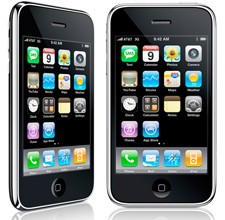
When the iPhone 4 becomes available later this week, many folks will find themselves with two iPhones: one shiny and new, the other slightly less so. Those not donating the past edition to a relative or friend might want to sell it. Here's what you can do to successfully and painlessly sell your "old" iPhone.
Pick a retailer
The most obvious choices are Ebay and Craigslist. Expect a flood of iPhones to hit their virtual shelves later this week. As of this writing, there are just over 1,700 16GB iPhone 3GSs available on Ebay and nearly as many listed on Craigslist for Boston. Remember that Ebay and Paypal will take a cut of your sales.
Of course, you have more choices than Ebay and Craigslist. When the 3GS came out, I sold my original iPhone to NextWorth. I provided information like model, condition, etc. and NextWorth gave me a value estimate. Then I printed the pre-paid shipping label and sent my iPhone off. Once they received it, they inspected it to confirm that it was as I described and promptly paid me via Paypal.
Read on for more...
Another option is SellYourMac (SYM). The process at SYM is nearly identical. Describe your iPhone, send it off and receive payment once it's been received and inspected. Both offer credit for accessories like a wall charger and earbuds.
If all that seems like too much work, you can take advantage of Radio Shack's trade-in program. Here's how it works. Complete the online form with details on your phone as with the other vendors. Or, bring it in to a Radio Shack store. They'll accept it and give you a gift card for the value of your phone, which you can use towards the purchase of an iPhone 4 (or a huge bag of alligator clips and AA batteries).
Prep your iPhone
No matter which retailer you choose, you must prep your iPhone for resale. It's a simple process, but it's important. Here's how to get your iPhone ready for its new owner.
Before shipping, you'll want to wipe your iPhone clean. The first, crucial step is to sync with iTunes and backup everything. Once that's done, click the Restore button (you'll be prompted once again to create a backup). Continue and restore your iPhone to its factory settings. All of your personal data will be removed.
You can also perform a restore with the iPhone itself. Select general settings and then tap restore. Note that this will erase everything, so do a backup first. It also takes a long time, so be sure that your battery is fully charged or, better yet, just plug in.
If you're super paranoid, you can do an iTunes restore followed by a general settings restore, but that's probably overkill.
[1] [2] 下一页 【已有很多网友发表了看法,点击参与讨论】【对英语不懂,点击提问】【英语论坛】【返回首页】
|