|
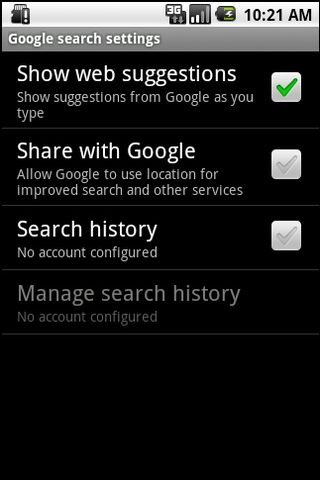
26. Turn off Google auto-suggest
If you're phone's a bit on the entry level side of things, your Google searching will be speeded up quite significantly by turning off the web suggestions feature. Having Google constantly guessing what you're about to type is nice, but can bring older phones crunching to a halt. Deactivate this feature by heading to Settings > Search > Google Search Settings.
27. Add a hotline to the Android Home screen
If there's one person you tend to call more than most - wife, councillor or parole officer - make it easy on yourself by adding a Direct Dial shortcut to the Home screen. Long-press on the background, then select Shortcuts then Direct Dial - to add the modern equivalent of a big red telephone to your Home page that instantly dials the one number without messing around with the Dialer or Contacts pages.
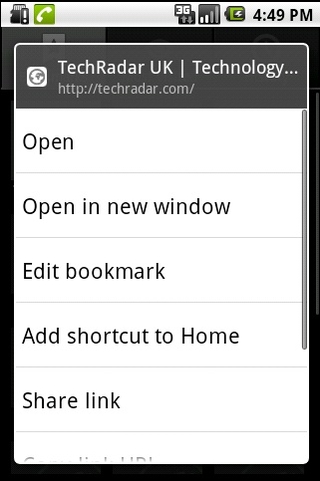
28. Add a hotline to Techradar
You can do the above with web site pages, too. Simply long-press on a web bookmark when in the browser, and you'll be given the option to "Add Shortcut to Home" - which will indeed drop an icon onto your Home screen that instantly launches the browser and starts loading your favourite site.
29. Shortcut to music playlists
If you've setup a playlist for your music, it's also possible to add a shortcut to that on the Home screen in a similar fashion. Beats fiddling with the music player.
30. Bypass Android slide unlock
You don't have to slide the screen locker to bring your phone out of standby. A double press of your phone's Menu button will also wake it up, as long as your manufacturer hasn't removed that feature from its skin.
上一页 [1] [2] [3] [4] [5] [6] [7] [8] 下一页 【已有很多网友发表了看法,点击参与讨论】【对英语不懂,点击提问】【英语论坛】【返回首页】
|