|
31. Unconfirmed deletions
Pressing Menu while in the Gallery lets you switch off the deletion confirmation dialogue, which could shave many seconds off your photo management times.
32. Alternate text fields
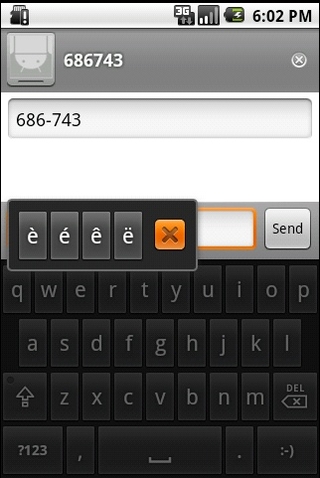
If you're a bit of a grammar fetishist, the Android stock keyboard can help. Holding down a key brings up a floating alternate text field for that letter, with all the special characters needed for accurately sending SMS messages to French and German people popping up.
33. More Android emoticions
The above tip also works with the Android keyboard's selection of smiley faces, with a long-press on the smiley pulling up loads more. Although there still aren't enough sad/depressed ones for our liking.
34. "What I meant was..."
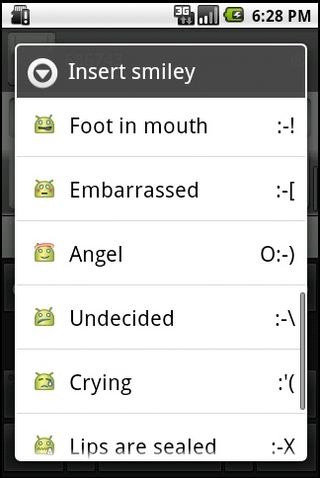
And if you're too old to know what all these smiley faces actually mean, press Menu then Insert Smiley while on the Android keyboard - then the meaning of them all is nicely explained for granddad.
35. Change Android auto-correct
If you're having problems with the Android keyboard auto-correcting or simply don't like words completing and capitalising themselves, the options can be changed in Settings > Language and Keyboard > Android Keyboard.
36. Install am Android file manager
The lack of a way to properly manage files on Android 2.1 is quite odd. Sure, you can delete photos and music from within their apps, but you'll need one of the many file managers on the Android Market to mass-delete things in comfort, PC style. Astro is a good, free one to start with.
37. Manage your Android battery
Keeping track of the occasional rogue app is important when it comes to making sure you've got enough battery left for those odd occasions when you might actually need to make a phone call. The data collected by your phone and stored under Settings > About Phone > Battery use will tell you if one of your apps is staying on and hammering your battery, letting you do the human thing and delete it.
38. Set keyboard, from keyboard
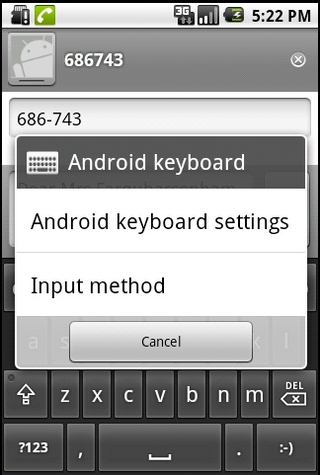
Another rather obscure feature, this. Long-pressing the 123 button on the standard Android keyboard brings up a keyboard settings page, where you're able to switch keyboards (if you have others installed) and fiddle with settings on the fly.
39. STOP
Also, further speed up your typing by double-pressing the spacebar - this automatically inserts a full-stop.
40. "Never heard of her"
If you need to delete all mentions of ex-partners from your phone, the dictionary can be edited - go to Settings > Language and Keyboard > User Dictionary to clean up your typing history.
上一页 [1] [2] [3] [4] [5] [6] [7] [8] 下一页 【已有很多网友发表了看法,点击参与讨论】【对英语不懂,点击提问】【英语论坛】【返回首页】
|